


Put credit spreads
Their own section. Percent of strike. The left-edge bar shows the row's health. Each row shows net close, premium and max loss.
Thanks for subscribing to OP-LIVE. Download details will be emailed before distribution starts Jan 1, 2027.
Local · Read-only · Private
OP-LIVE by ExactWEB is a real-time options portfolio dashboard for moomoo accounts, read through OpenD. It runs on your own computer, is read-only by design, and never places, changes or submits trades. Private data stays local.
For moomoo accounts, through OpenD. Free download from January 1, 2027.
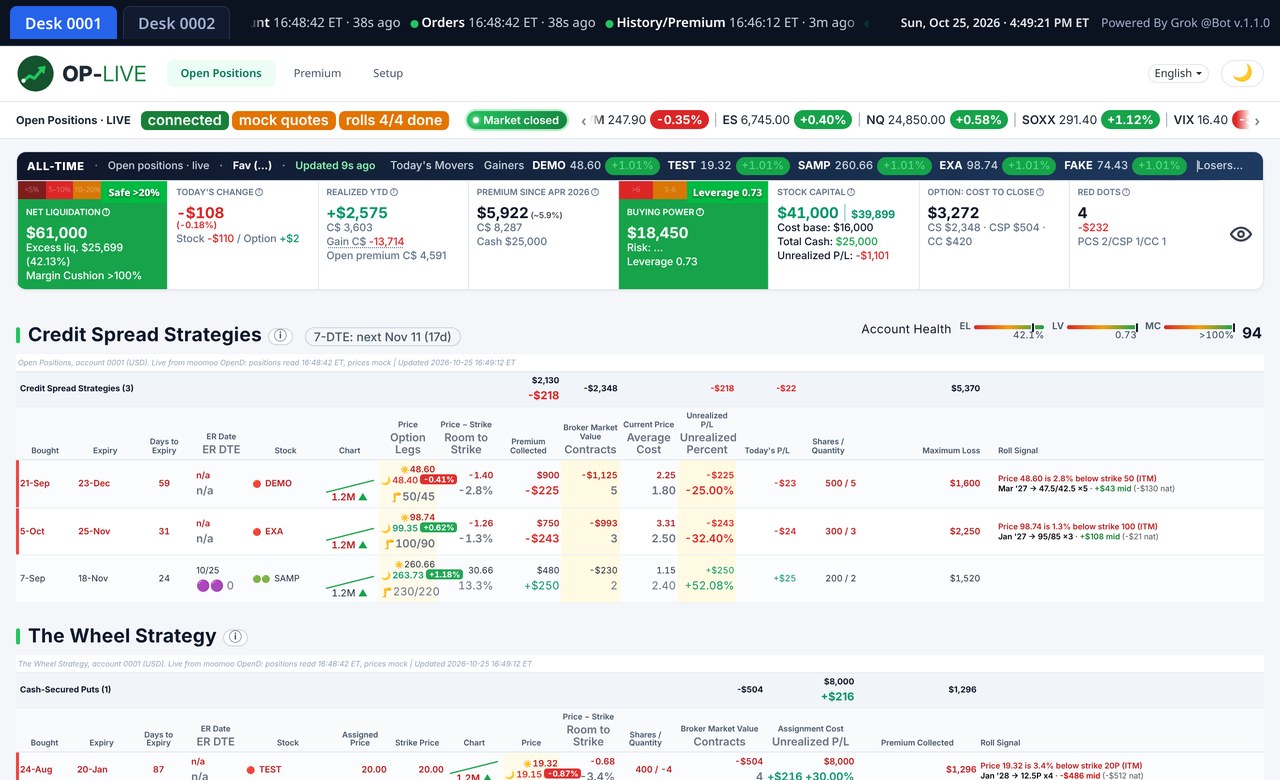
Demo data: example tickers and numbers, not a real account
Integrations
OP-LIVE reads moomoo accounts through OpenD on your computer. The connection is read-only and never places, changes or submits trades. Other brokers on this page are not connected yet.


Features
Positions, premium and alerts for moomoo accounts, through the day.
Their own section. Percent of strike. The left-edge bar shows the row's health. Each row shows net close, premium and max loss.
Bear call spreads have their own section, laid out the same way: net close, premium and max loss. A call credit spread is never shown as a covered call.
Stock-backed, and kept apart from call credit spreads. Percent captured, and a roll signal when it is time to review the next one.
You see the real risk of every spread. An uncovered call spread is not mistaken for a stock-backed covered call.
Net Liq and Buying Power each show today's percent move. With them: today's change, year-to-date premium, realized year-to-date, stock capital, cost to close and red-dot alerts. Several accounts can sit on the same screen, each with its own figures.
The money kept if the position were closed now.
An ALL-TIME bar rolls with the open positions and stays beside today's figures.
An ER dot marks earnings on a name, including a date that falls before expiry.
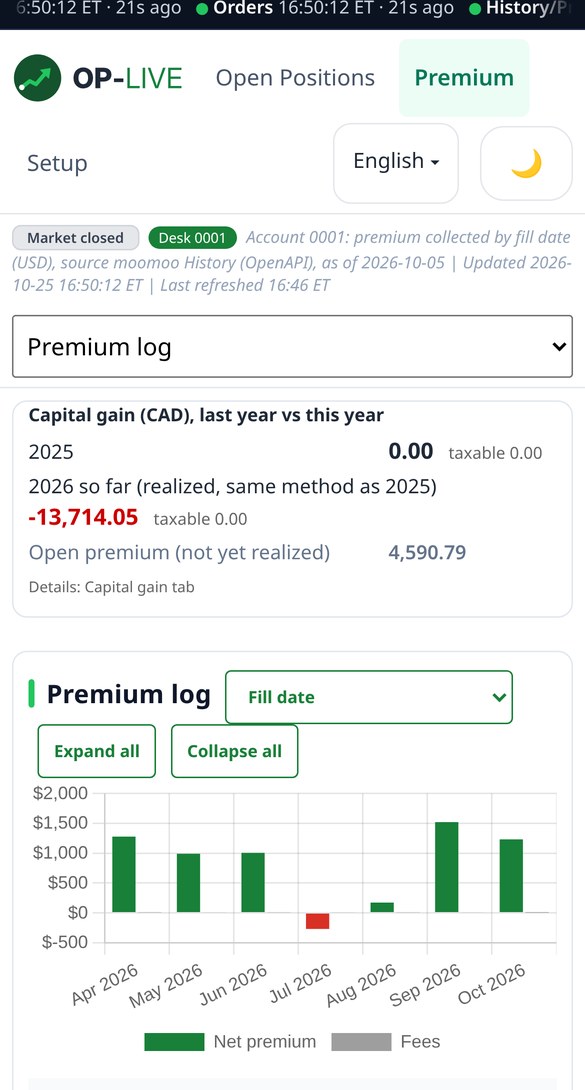
A log of premium collected, with roll-chain accounting so a roll stays one chain.
Capital gain follows the moomoo method, so the figure can be checked against the broker. It is a calculation on your own data, not tax advice.
If the dashboard runs twice, loses its broker link, or prices stop updating during market hours, a watchdog notices within minutes. It restarts the dashboard cleanly as one copy and confirms live data is flowing. It never touches the broker connection software or a trade. Every action is logged.
A desktop layout, and a layout for a 390px-wide phone. English, French and Chinese. Light and dark.
An Investments page tracks long stock holdings on each desk: ticker, shares and open price, with the live price and the gain in dollars and percent. Amounts are in US$. CA$ is shown on the day change line and the unrealized line. A manual cash line is included in the total. Totals also include cost base, market value and gain. After-hours and pre-market prices are tagged AH or PM, and a price says updated a few seconds ago. Hover a holding for the purchase lots and dates. It is read-only. An unconfirmed price shows “…”, and totals wait until every price is in.
Opportunities
Bull put spreads and bear call spreads appear in one list, tagged PCS or CCS in a Short Delta column. Income setups on both sides of the market, in one place. Each setup shows a Found time, and the list is sorted newest first. The scan keeps to a few rules.
Illustration only. Sample tickers, newest first. Not a live scan.
When a holding has 100 or more uncovered shares, OP-LIVE suggests the nearest monthly expiry with no earnings before it, and a strike at least 15% above the price and above cost. It shows the premium. Income on shares already held, with the strike high enough that the upside is not capped right away.

OP-LIVE suggests a roll only when it is a credit, even, or a small debit. Otherwise it shows the cost to close. The cell is three lines: new credit, cost to close, and how far the new strike is out of the money, with the exit date and earnings timing. Hover the cell for the rest.

On a position that runs through earnings, the options-implied move, for example ±18.6%, shows under the ER date.

ALL-TIME, Credit Spread, Wheel and Opportunities each fold. OP-LIVE remembers which are open, across devices.

Call credit spreads are marked with a teal dot and a light magenta row. Put credit spreads are marked with an indigo dot. The two kinds are clear at a glance.
Opportunities shows only setups found in the last 15 minutes, newest on top. A quote that has gone stale does not stay on the list.
Red-dot alerts are split. A credit spread and a covered call each have their own dot, so one is not read as the other.
For SPY and QQQ, the scan keeps a setup only when the credit is at least US$1.50.
Status messages say broker link. If the broker link drops, the page shows that message, retries on its own, and comes back with fresh data in about 40 seconds.
Next to DTE, the short option's remaining time value is shown, for example TV US$5.30, on positions within 21 days of expiry or flagged at risk. It helps decide whether to hold, close or roll.


Each row leads with the ticker, then the status dots and the roll and close buttons, so the symbol reads first. On a phone, the share count follows the ticker. Words that appear when you rest on a position row stay still. They do not blink.

On a phone, every tab, the EN/FR/中 language switch and the dark-mode toggle sit on one line.

The big title is replaced by a small green ● Live marker. It turns grey when the data is stale.

Amber marks a row to watch, at −50% of the credit, and that row blinks fast. Amber ranks below red.
The capital tile shows US$ and CA$ values side by side, plus long-term investment totals.
Each line shows your limit, the live combo mid, and the signed gap, which is mid − limit. A negative number is a credit, and a roll uses that same sign as the limit. The mid comes from fresh broker quotes, less than 30 seconds old, and shows … until every leg has a real two-sided quote. On a phone, a compact yellow Pending Orders box sits under the All-Time banner, with one line per order: Qty, Placed, Limit, Mid. On a desktop, the Pending Orders header refreshes that box faster.
Each position row has a coloured bar on the left edge. Green means healthy, amber means watch, and red means it needs attention.
Gold and Bitcoin prices are labelled as coming from Yahoo Finance.
Sign in with your username and your password. You sign in once on each device and stay signed in for about a year. A desk login sees only its own desk. Log out is a link at the bottom right. If an old tab has lost its sign-in, it goes back to the sign-in page.
Install the Tailscale app, accept the shared-device invite, then open the link you're given.
Green and red rows share one rhythm. Amber rows blink faster. Red dots blink on their own.
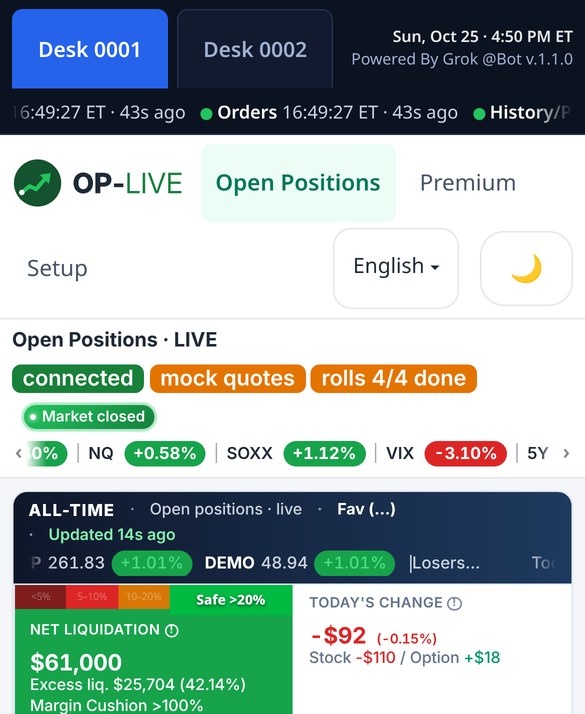
Demo data: example tickers and numbers, not a real account
Pricing
Distribution starts January 1, 2027. The download is free. The yearly subscription is for one person, on your own computers, with updates while it is active.
OP-LIVE yearly
US$998US$499 / year
Use code FIRSTYEAR at checkout for 50% off your first year. Renews at US$499/year.
Setup
OP-LIVE is read-only in every setup. Choose where it runs and how you reach your dashboard.
OP-LIVE runs on your own computer or laptop. Your phone, tablet and other devices connect over your home Wi-Fi.
Install the Tailscale app, accept the shared-device invite, then open the link you're given.
Available on request: OP-LIVE set up on a private VPS just for you, with your own domain, for use anywhere. Still read-only.
Ask about cloud setupSign in with your username and your password. You sign in once on each device and stay signed in for about a year. A desk login sees only its own desk. Log out is a link at the bottom right. If an old tab has lost its sign-in, it goes back to the sign-in page.
Download
Free download from January 1, 2027. These steps install OP-LIVE on your own computer, for the home and remote setups. Nothing is installed in the cloud, and private data stays on your machine. Yearly subscription: US$499/year. Use code FIRSTYEAR at checkout for 50% off your first year.
macOS 12 or later, Apple silicon or Intel (placeholder).
Windows 10 or 11, 64-bit (placeholder). Windows timing to be confirmed.
Away from home? Install the Tailscale app, accept the shared-device invite, then open the link you're given. A cloud/VPS setup is also available on request, for an extra fee.
FAQ
No. OP-LIVE is read-only by design. It never places, changes or submits trades, and it doesn't unlock trading. It only reads positions, balances, quotes and order history. A staged ticket is copied to your clipboard as plain text. OP-LIVE never places, sends or pre-fills an order.
You sign in to OP-LIVE with your username and password. You sign in once on each device and stay signed in for about a year. A desk login sees only its own desk. Log out is a link at the bottom right. If an old tab has lost its sign-in, it goes back to the sign-in page. You also sign in to your broker's gateway on your computer. OP-LIVE never asks for your trading password, and that password never leaves your machine.
On your computer, in the home and remote setups. OP-LIVE runs locally and keeps its cache in a local database. ExactWEB doesn't receive your positions or balances. The cloud/VPS option, available on request for an extra fee, runs on a private server just for you, still read-only.
moomoo, through OpenD, on your computer. Interactive Brokers, tastytrade, Charles Schwab and Robinhood are not connected yet. You need a moomoo account with API access enabled.
Yes. There is a layout for a phone at 390px wide, and a desktop layout. At home, open OP-LIVE on the same Wi-Fi. Away from home, install the Tailscale app, accept the shared-device invite, then open the link you're given.
No. OP-LIVE shows your own data and straightforward calculations, including capital gain by the moomoo method. Nothing on this site or in the app is financial, investment or tax advice. Confirm figures with your statements and your accountant.
The download is free starting January 1, 2027. The subscription is US$499/year. Use code FIRSTYEAR at checkout for 50% off your first year. It renews at US$499/year. You can cancel any time before renewal, and OP-LIVE keeps working until the end of the paid year.
ExactWEB
ExactWEB Solutions is the Canadian company behind OP-LIVE. ExactWEB has built software since 2000, and OP-LIVE started as a tool used on a real trading desk every day.
Email ExactWEB
Questions, the January 1, 2027 waitlist, or support. Replies within two business days.